> ## Documentation Index
> Fetch the complete documentation index at: https://docs.assistantscenter.com/llms.txt
> Use this file to discover all available pages before exploring further.
# Premium
> An Object which contains all the premium information.
```js theme={null}
theme: SoftUI({
premium: {
enabled: Boolean,
card: {
title: String,
description: String,
bgImage: String,
button: {
text: String,
url: String,
},
},
},
});
```
## Example Usage
```js theme={null}
theme: SoftUI({
premium: {
enabled: true,
card: {
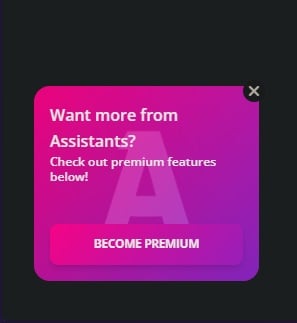
title: "Want more from Assistants?",
description: "Check out premium features below!",
bgImage:
"https://assistantscenter.com/wp-content/uploads/2021/11/cropped-cropped-logov6.png",
button: {
text: "Become Premium",
url: "https://patreon.com/sharkybot",
},
},
},
});
```
This is NOT visible on the main. Only in the servers pages.
## Image
 ## Props
Indicate if the premium card should be enabled
The title of the premium card
The description of the premium card
The background image of the premium card
The text of the button
The link of the button
## Props
Indicate if the premium card should be enabled
The title of the premium card
The description of the premium card
The background image of the premium card
The text of the button
The link of the button